What’s New in v5.2.0
We’re pleased to introduce the latest updates to GBD Compass, designed to provide greater visibility into coverage, enhance reporting flexibility, and make performance analysis more actionable. This release introduces the new Non-Coverage Keywords View with an Overall Coverage in Keyword Visibility report, expanded domain type filtering and visibility controls across AIO SERP Detail reports, and a new Product Overview Report for MAP. It also includes reporting refinements such as improved Prompt Snapshot citation handling and daily trend lines for Ads in SERP, Ads in AIO, and Ads Above AIO, making it easier to understand changes in search and AI visibility over time.
New Features, Enhancements and Fixes
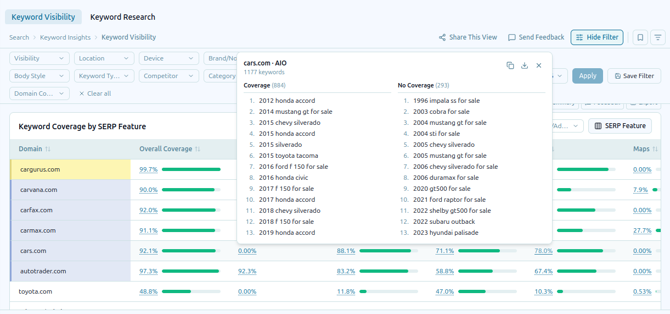
Non-Coverage Keywords Report with an Overall Coverage view in Keyword Visibility
Use the Non-Coverage Keywords Report to identify keywords where your brand has no visibility across tracked results. The Overall Coverage column provides a consolidated view of coverage performance, helping you quickly spot coverage gaps, prioritize keywords that need attention, and better understand opportunities to improve your overall visibility.
Report-Wise Annotations Visibility in Trendlines
The new report-specific annotation visibility controls give you greater flexibility in managing which annotations appear on trendlines across different reports. You can now choose to include or exclude annotations based on the context and relevance of each report, making trend analysis more focused and easier to interpret. For example, an annotation related to an incident or change in SEM or LLM performance may be useful when analyzing those channels but may not be relevant to an Organic report. By excluding unrelated annotations, you can keep each report focused on the factors that directly impact the performance being analyzed.
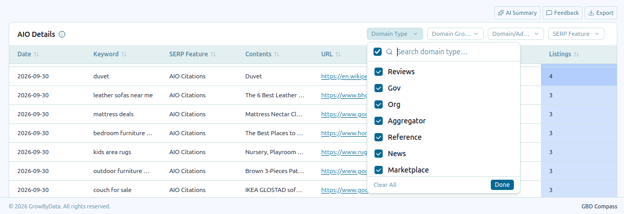
Domain Type Filter and Column in the AIO Detail Report
The AIO SERP Detail reports now provide greater flexibility with enhanced domain type filtering and visibility controls. A new Domain Type column makes it easier to identify and understand the types of domains appearing across AIO search results, while the filtering capability allows you to focus your analysis on specific domain types relevant to your reporting needs. These improvements make it simpler to segment SERP data, compare visibility across different domain categories, and identify patterns in how domains are represented within AIO results. By bringing domain type information directly into the report, you can gain more actionable insights without needing additional manual analysis.
Product Overview Report for MAP Monitoring
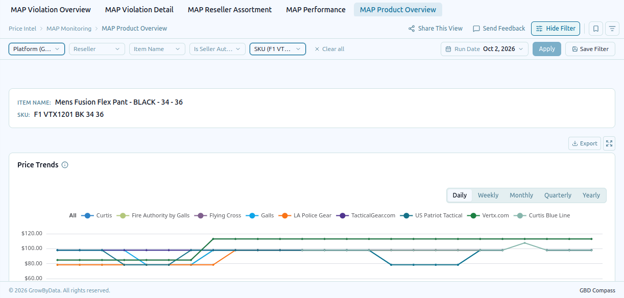
The new Product Overview report provides a simplified way to monitor MAP performance by separating product-level insights from CPI reporting. By giving Product Overview its own dedicated report, you can focus specifically on product visibility and performance without navigating through broader CPI data. This clearer separation makes MAP monitoring more intuitive, helps teams quickly identify product-level trends, and enables more focused analysis for ongoing optimization and reporting.
Enhancements
Enhanced Ads Trend Reporting
Added daily trend lines for Ads in SERP, Ads in AIO, and Ads Above AIO to the Ads in SERP over Time chart, providing a clearer view of advertising trends over time.
Expanded Keyword Visibility Filtering
Added a Domain Coverage global filter to the Keyword Visibility Report, making it easier to refine analysis and focus on the domains most relevant to your visibility insights.
More Helpful Password Reset Emails
Enhanced password reset emails with additional information to provide clearer guidance and a smoother account recovery experience.
Clickable Competitor Pricing Links
Prices in the Product Overview and Seller Assortment Detail reports are now clickable, allowing you to quickly access the competitor’s external product page for additional details.
Bug Fixes
Improved Prompt Snapshot Brand Mentions
Updated Prompt Snapshot citation handling to ensure brand mentions within citations are excluded from the brand mention calculation, providing more accurate reporting.
Improved Branded vs. Non-Branded Keyword Filtering
Fixed an issue in Regional Insights where branded keywords could appear when the Non-Branded keyword filter was selected, ensuring filtering results now accurately reflect the selected keyword classification.