

The best Google Shopping visibility tools depend on what you need to measure. GrowByData is built for enterprise competitive visibility, including SKU- and query-level Shopping monitoring, named competitors, pricing, placement and Share of Voice. Google Merchant Center is the best free first-party starting point, while platforms such as DataFeedWatch focus primarily on feed optimization and Semrush provides broader PPC and keyword intelligence.
By the time a team starts comparing Google Shopping monitoring tools, they usually have one question Google Ads will not answer: who took my impression share, on which products, and by how much.
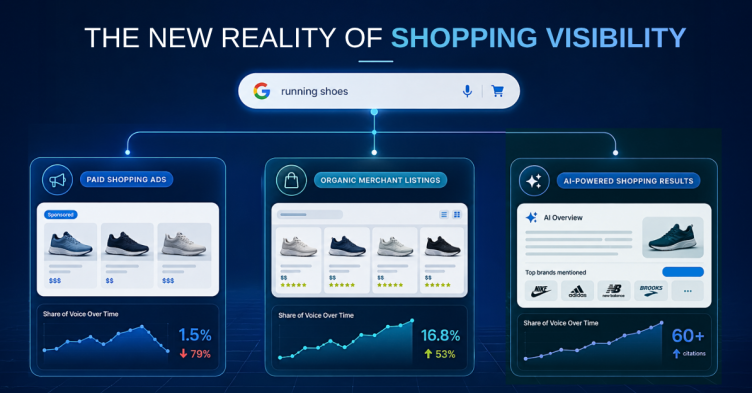
A Google Shopping monitoring tool tracks how products appear across Google’s Shopping surfaces, which now include Shopping Ads, the Shopping tab, organic Merchant Listings, and the product panels turning up inside AI Overviews and AI Mode. Some of these tools watch your own catalog. A smaller number watch everyone else’s, and that second group is where most of the useful information sits.
That split runs through the middle of this category and causes more bad purchases than any feature gap. One set of tools helps you send better data to Google. Another set tells you what competitors are doing in the auction. They get compared side by side in the same articles as though a team could reasonably pick either, which is how a performance marketing director ends up six weeks into a feed platform rollout still unable to name a single competitor.
What’s in this guide
What a Google Shopping monitoring tool is supposed to do
Your Shopping impression share drops eleven points over three weeks. Google Ads confirms the drop. It will not tell you who took the share, whether they took it on your best margin products or your clearance stock, whether they started bidding on your brand terms, or whether one competitor cut four dollars off a hero SKU and pulled the category average down behind it.
Merchant Center closes part of that gap. Competitive Visibility benchmarks you against an anonymized peer group, and Price Competitiveness shows whether your prices sit above or below market on a given product. Both reports are useful and most teams have not read them closely. Neither names a competitor, and neither works at the level a category manager operates at, which is this product, this query, this day, this price.
That unnamed competitor is the reason this category exists.
What should a Google Shopping monitoring tool actually track?
Five things, roughly ordered by how often each changes a decision.
Competitive presence at the SKU and query level: which named competitors show up on the searches your products compete for, and how often. Aggregate visibility scores look fine in a QBR deck and rarely survive contact with a bid decision.
Price as displayed inside the Shopping unit. That number is frequently promotional and frequently different from the price sitting on the competitor’s own product page, which is why price checks run off product pages tend to disagree with what buyers are actually seeing.
Title and attribute changes. Competitors rewrite product titles constantly, and a title that picks up a size or a material can become eligible for query sets it had no presence in last week.
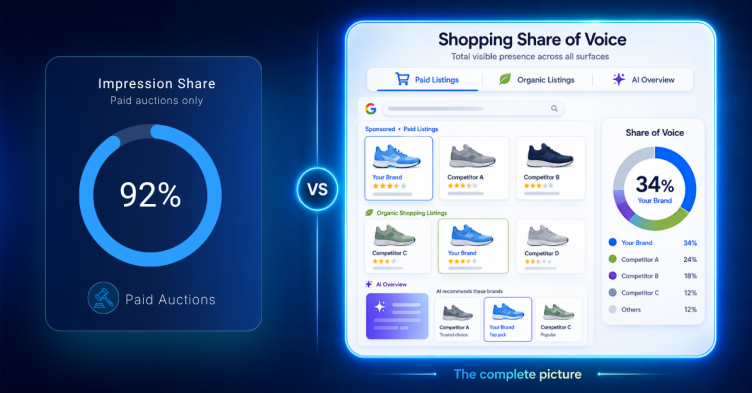
The split between paid Shopping Ads, organic Merchant Listings, and Shopping tab placements. Three surfaces, three sets of mechanics, reported as one number more often than they should be.
Share of voice as a trend with competitor names attached, rather than a single-day snapshot. The measurement mechanics are worth understanding before you buy anything, and we’ve broken them down in Google Share of Voice.
Every tool below does some of this. None does all of it, ours included.
Evaluating Shopping tools for an enterprise catalog?
A GrowByData analyst will pull live competitive data on your own SKUs and show you what your current stack is missing before you sign anything.
The tools, and what each one is for
1. Google Merchant Center and Google Ads
Start here, because most teams have not finished using what they already pay for.
Competitive Visibility compares your visibility against an anonymized set of similar retailers. Price Competitiveness shows where your prices land relative to the market, product by product. Between them you can usually work out whether you have a visibility problem or a pricing problem, and that answer determines everything you buy afterward.
Then it runs out. Nobody gets named, the data is aggregated, and it lags. You can watch yourself lose ground with no way to identify who took it or where. For a team running a few hundred SKUs in one country, this is often enough and additional software would sit unused. For a $50M+ catalog across several markets, it stops being enough inside a quarter.
2. DataFeedWatch and feed management platforms
Feed tools appear in this list because people search for them here, not because they solve the same problem.
They optimize what you send to Google: title structures, attribute mapping, category assignment, rule-based transformations across sales channels. If your Shopping performance issue is really a feed quality issue, and a surprising share of them are, this is the right purchase and a competitive intelligence platform will not help you. Disapprovals and weak titles cost more visibility than most teams account for.
What feed platforms cannot do is look outward. They improve your inputs. They do not watch the auction, and they will not tell you what a competitor changed on Tuesday.
3. Semrush
Semrush is what a generalist SEO recommends when someone asks about Shopping, and as a first stop it is reasonable.
It surfaces PLA data at the keyword level: which advertisers appear on product-related searches, some ad copy history, estimated traffic. For a broad question about who is active in your category, it answers faster than anything you could build internally.
The limitation is structural rather than a missing feature. The data is keyword-first instead of SKU-first, and the refresh cadence was not designed for daily competitive tracking. You will learn that a competitor is investing in your category. You will not learn that they repriced your top eight products on Tuesday morning. Semrush is a strong SEO platform that happens to include Shopping data, which is a different product from a Shopping monitoring system, and the gap between those two usually surfaces about a renewal cycle in.
4. Similarweb
Similarweb models traffic and market share at the domain level, and for market sizing or a board conversation about category share it does that job well.
The Shopping data is estimated rather than observed at the SERP. That distinction sounds academic until a performance marketer moves bids against a modeled number and cannot explain the result three weeks later.
Use it for strategy. Do not run campaigns off it.
5. Adbeat
Adbeat covers display and programmatic intelligence, and it is good at that: creative libraries, publisher placements, estimated display spend.
Shopping Ads coverage is thin, because Shopping is a different surface with different mechanics and the product was not built for it. Teams sometimes buy it expecting Shopping visibility and end up with a display research tool they had not budgeted for. Better to know that before the demo.
6. GrowByData – Best for Competitive Google Shopping Visibility and Share of Voice
We built this for the gap the tools above leave open, so weigh this section accordingly.
GrowByData tracks Google Shopping Ads and Merchant Listings at the SKU and query level, daily, across your chosen markets and devices. Named competitors, their product titles, their displayed prices, their position in the Shopping unit, and how all of it moves week over week. The same tracking runs across SERP features and AI surfaces, so Shopping visibility sits next to organic and AI visibility in one view instead of three tools that disagree with each other. The paid side sits under Google Shopping Ads monitoring, and both surfaces together under Google Shopping monitoring.
The tradeoff is real and worth stating plainly. This is a managed enterprise platform with an onboarding period, not something you switch on over lunch. You define the keyword and SKU set with an analyst, and tracking runs for several days before the dashboard means anything. If you need an answer this afternoon, that is a genuine cost. We also do not manage your feed or your bids. We tell you what is happening in the auction and hand it to the people who act on it.
It fits enterprise brands, retailers, and agencies that need competitor-named SKU-level data and can trade instant setup for depth.
How to choose between Google Shopping monitoring tools
Feature matrices are how vendors win comparisons. Answer one question instead: what decision are you trying to make faster?
The best Google Shopping Visibility tools at a glance
Most teams need two of these. The common failure is buying one, expecting it to answer a question from a different row, and concluding the tool is bad.
The problem most teams hit around month six
This comes up in nearly every enterprise evaluation we run, and it is not really about Shopping.
Performance marketing buys a Shopping tool. SEO already has a rank tracker. Somebody in brand has quietly started paying for an AI visibility tool because a VP asked why the company does not come up in ChatGPT. Three subscriptions, three definitions of visibility, three numbers that will not reconcile. Then the CMO asks a simple question about category presence and nobody can answer it without a spreadsheet merge and most of a week.
Which sounds like a reporting problem. It is not. The dashboards work fine. What is missing underneath them is one methodology, so the numbers can be compared at all.
Shopping has also stopped behaving like a separate channel. Product results now appear inside AI Overviews and AI Mode alongside organic listings and text ads, on the same query, in the same viewport. A tool watching only the Shopping unit is measuring a shrinking share of where your products actually appear.
That is the argument for tracking Shopping, SERP features, and AI surfaces on one query set with one method. Unified sounds like a pitch word and usually is. The practical version is duller: while three teams argue about whose number is right, nobody is watching the competitor taking the category.
Where to start
If you have not exhausted Competitive Visibility and Price Competitiveness in Merchant Center, spend an hour there this week. It costs nothing and tells you whether you are looking at a visibility problem or a pricing problem, which changes what you should buy next.
If you already know it is a competitive visibility problem and you are tired of arguing about whose estimate is right, the next step is real data on your own SKUs rather than a demo built on somebody else’s catalog.
See what competitors are doing on your products
GrowByData will track your live SKU and keyword set for several days, then walk you through what the data shows, including the parts that are not flattering. Bring your three most contested product categories.