
What’s New in v5.1.0
We’re pleased to introduce the latest updates to GBD Compass, focused on making LLM reporting more accessible and improving the overall reporting experience.
This release includes customer access to the Prompt Suggestion Tool, updates to LLM platform coverage, and several usability and reporting improvements.
New Features, Enhancements and Fixes
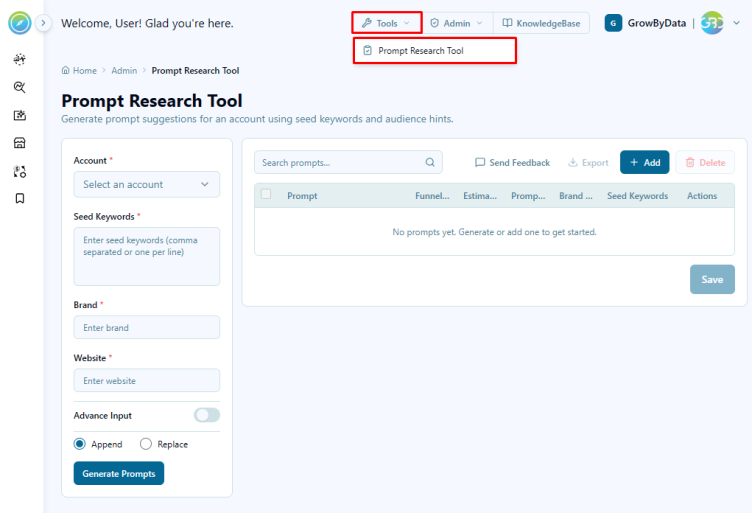
1. Prompt Suggestion Tool Now Available to Customers
Customers subscribed to LLM Reports can now access the Prompt Suggestion Tool directly within GBD Compass.
The tool helps customers generate relevant prompts for their reporting and analysis needs, making it easier to get started and maximize the value of LLM insights.
2. Improved CSV Export File Naming
CSV export file names now dynamically reflect the selected date range, instead of using the default date range. This makes exported reports easier to identify and manage.
3. Improved Key Metric Card Layout
We’ve resolved a layout issue affecting the Key Metric Cards in the AIO and Ads sections of the SERP Overview Report, providing a cleaner and more consistent reporting experience.
4. Correct Bookmark Icons
We’ve updated the Bookmark menu icons in the Competitive Pricing and Map Monitoring reports to use the correct icons, providing a more consistent and intuitive navigation experience.
5. Improved Chart Legend Experience
We’ve resolved an issue affecting charts with multiple pages of legends. Previously, selecting the last legend could cause the legend to navigation to unexpectedly scroll back to the first item.
The legend now maintains the correct position when navigating and selecting items, providing a smoother and more predictable chart interaction experience.
Upcoming Features
1. DX Migration to Compass
We are planning to migrate Data Exchange from its current standalone legacy application into the GBD Compass platform, re-engineering it on the Compass framework to deliver a unified, scalable, and highly maintainable architecture. This move consolidates Data Exchange’s capabilities alongside our other insights of products, replacing fragmented infrastructure and disparate UI patterns with one consistent, modern experience. This strategic upgrade positions us to deliver faster, more reliable insights while streamlining the platform for long-term growth.
2. CPI and Map Internal Reports
We’re introducing a new set of CPI and MAP Internal Reports, including Specialist Dashboards, Email Tracking Reports, and Monitoring Dashboards. These reports are designed to give internal teams greater visibility into overall report runs, email activity, and system monitoring. The new dashboards will make it easier for internal users to track report execution, monitor ongoing activities, identify potential issues, and manage email tracking from a centralized view. This enhancement will improve operational visibility and help teams manage and monitor CPI and MAP reporting activities more efficiently.