
April 2026 Release
TL;DR
This release delivers significant enhancements across LLM intelligence and SERP reporting, empowering users with greater visibility, smarter filtering, and AI-driven insights.
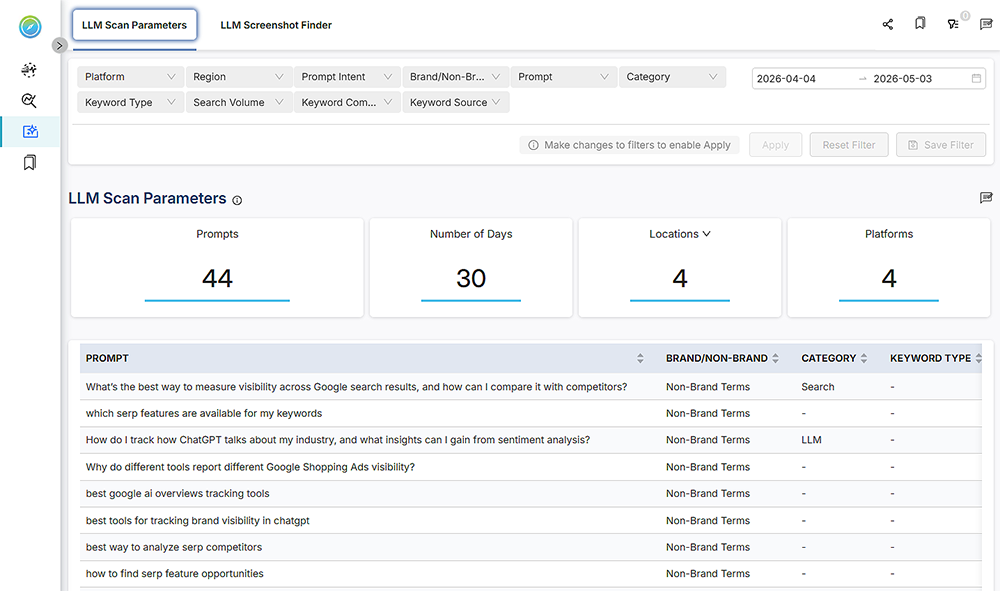
The new LLM Scan Parameter Page offers a comprehensive, centralized view of all scan parameters driving LLM data collection including prompts, number of days, locations, and platforms. Prompts are intelligently categorized by brand and non-brand terms, empowering users to pinpoint the most relevant insights and act on data with greater precision and confidence.
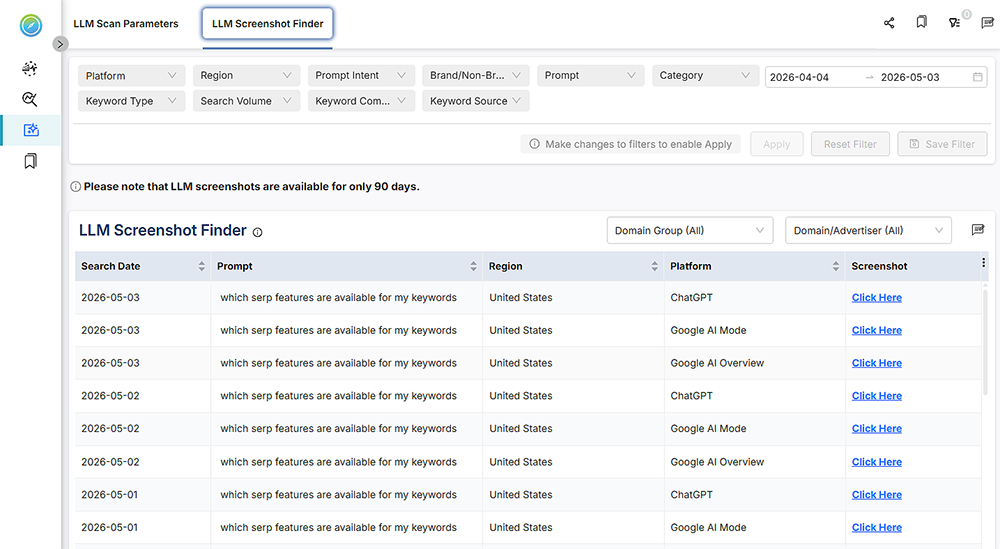
The LLM Screenshot Finder displays how users audit AI-powered search visibility. A structured, visual screenshot captured across LLM-driven searches filterable by search date, prompt, region, and platform gives users an immediate and clear understanding of how their content performs and appears across AI platforms.
The Domain Group filter is now available across all reports supporting Domain/Advertiser filtering, bringing a more sophisticated layer of segmentation to competitive intelligence. Users can now conduct sharper, more targeted analysis and extract deeper competitive insights from their reporting with greater ease.
ChatGBD is now fully operational across all applicable SERP reports, delivering AI-powered summaries of each charts and tables.
This release also includes a range of usability enhancements and bug fixes, delivering a smoother, more reliable, and more focused product experience overall.
What’s New
New Features, Enhancements and Fixes
1. LLM Scan Parameters
We’ve added the LLM Scan Parameter Page, giving you greater visibility into your AI-powered search performance. You can now view key scan metrics including total number of prompts, number of days analyzed, locations, and platforms covered.
The page also features a detailed prompt table that categorizes results by brand and non-brand terms, enabling users to quickly assess how their content surfaces across LLM-driven queries and make more informed optimization decisions.
2. LLM Screenshot Finder
We’ve added the LLM Screenshot Finder report, allowing you to easily locate and review screenshots captured from AI-powered searches. The finder displays key details including search date, prompt, region, and platform alongside the corresponding screenshots, giving you a clear, visual record of how your content appears across LLM-driven search results.
3. Added Domain Group filter across all reports
We have added the Domain Group component filter across all reports that currently support Domain/Advertiser filtering. Users can now segment and analyze data by domain groups, providing a more structured, and segmented way to filter results and uncover deeper competitive insights.
4. Enhancements
- ChatGBD, AI-powered summaries of charts and tables is added to all missing SERP Reports. ChatGBD is now fully operational across all reports, enabling faster analysis and more intelligent decision-making.
- Exported files for Keyword Presence & Visibility and Keyword Presence by SERP Feature tables now include labels.
5. Bug Fixes
- Resolved an issue where Brand Conquest Monitor was not loading data.
- Resolved an issue where Organic Ranking of Etsy daily and Etsy Weekly was not loading data.
Known Issues
- Nested/Cascading Filters at report level not fully functional
Currently, component filters at the report/view level do not fully support nested/cascading behavior. When a filter is selected, related filters may not automatically adjust to show only relevant options. We are aware of this issue and plan to address it in an upcoming release. - Report Components occasionally appear blank after applying filters
Report components such as tables and charts across different pages may occasionally appear blank after applying filters. The content becomes visible again only after reloading the report and reapplying the filter. We are aware of this behavior and are working on a fix in an upcoming release.
Upcoming Features
- A fresh, modern UI Experience
We’re excited to announce an upcoming redesign of the platform’s user interface. It will introduce a modern, refreshed look and feel across the entire application, delivering a more intuitive, visually consistent, and seamless user experience. Every screen, component, and interaction have been thoughtfully reimagined to help users navigate faster, work more efficiently, and get the most out of the platform. - Improved AI Summary
We’re enhancing the AI Summary in select reports to make it more actionable and closely aligned with real workflows driven by the underlying data. For example, in the Text Ad Details table, the AI will analyze ad copy to infer strategy and compare it with your own ads. We’ll be rolling out these enhancements across several reports.