
TL; DR
This release introduces a wave of new reporting capabilities and platform enhancements. Users gain a new Ad Insights suite for tracking sponsored ad activity across LLM engines, alongside an enhanced Product Insight report with a cleaner title format, a new visibility score, and an organic/sponsored filter. LLM reporting now also supports device-level filtering for manual accounts.
Amazon coverage has expanded significantly with five new reports. Listing Insights, Merchandising Insights, Ad Title Insights, Scan Parameters, and Screenshot Finder giving deeper visibility into competitive pricing, keywords, listings, and ad title performance.
Reporting flexibility has improved further with a new Compare tab for time periods of analysis, a Response Section filter in the LLM Screenshot Finder, and the ability to export charts as images.
We’ve updated our Knowledge Base with two video resources for GBD Compass. The “Getting Started with GBD Compass” video has been refreshed to reflect the new Compass design, giving you an up-to-date walkthrough of the current interface. We’ve also added a brand-new video, “Mastering GBD Compass Filters,” which covers how to use filters effectively to find and refine your data. Both videos are now live in the Knowledge Base.
Together, these releases also include a range of usability enhancements and bug fixes, delivering a smoother, more reliable, and more focused product experience overall.
New Features
1. Added Ad Insight Reports
We’ve introduced a new Ad Insights report, giving users clear and comprehensive visibility into sponsored advertisements appearing across Large Language Model (LLM) engines. As AI-generated responses increasingly surface sponsored content, this report helps users understand exactly how, where, and how often that advertising shows up, and what it means for their brand’s presence in the AI landscape.
With this report, users can track how frequently sponsored ads appear across different LLM engines, compare brand performance based on sponsored ad visibility, and gain a deeper understanding of how ads are distributed across different prompts and user intents, revealing patterns in when and why sponsored content surfaces.
The report is organized into four dedicated pages to support both quick, high-level review and detailed analysis.
The Ad Insight Presence page offers a high-level snapshot of sponsored ad performance and key metrics, giving users an at-a-glance understanding of overall trends.
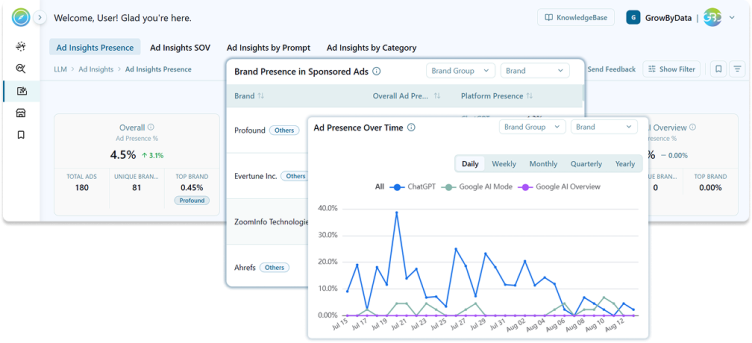
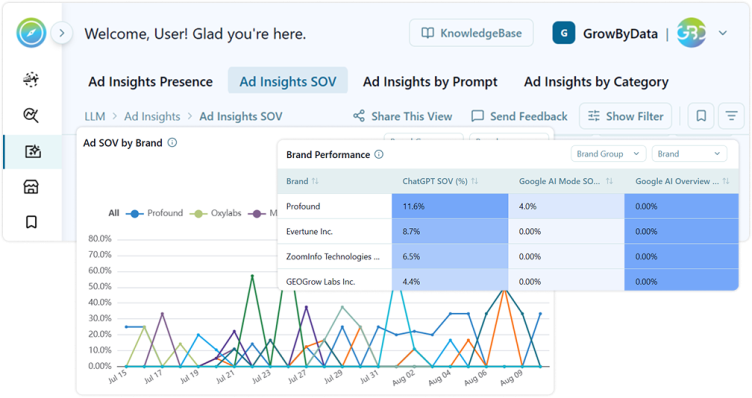
The Ad SOV by Brand page delivers deeper insight into Share of Voice performance, tracking trends for the top 10 brands across LLM-driven ads, and highlighting each brand’s competitive standing across every LLM platform.
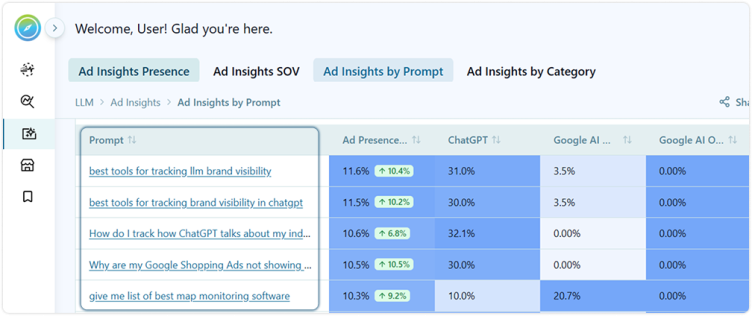
The Ad Insights by Prompt page enables granular, prompt-level analysis of ad presence across platforms, surfacing the leading brand and competitive intensity for each prompt.
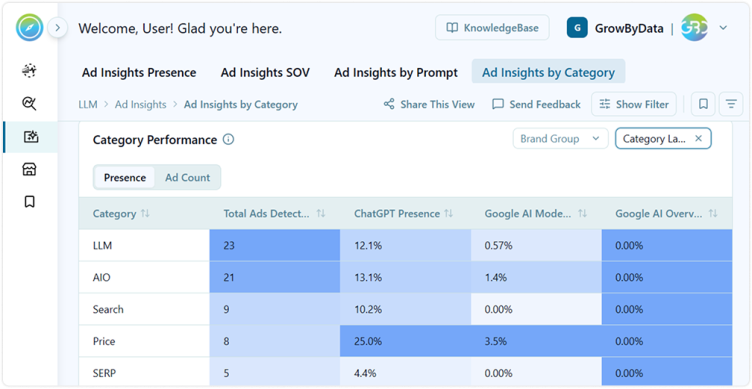
Finally, the Ad Insights by Category page provides total ads detected along with ad presence and ad count by platform, broken down for each prompt category.
2. Added Compared To tab within the date range
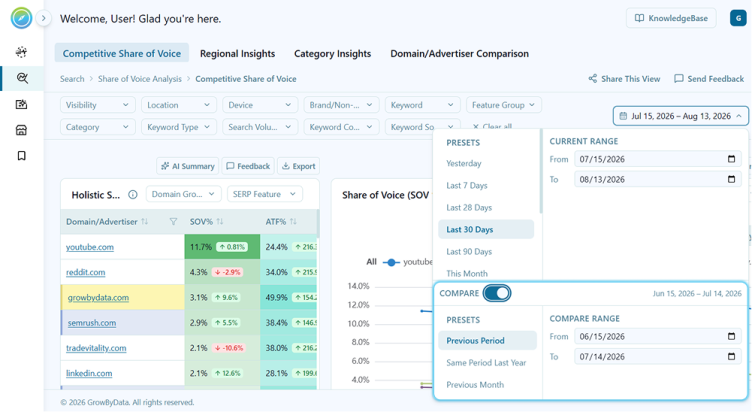
We’ve introduced a new Compare tab within the date filter, giving you the flexibility to benchmark performance across time periods with ease. Choose from preset comparison ranges such as the previous period, the same period last year, the previous month, or select a custom date range tailored to your specific needs. Comparison results are displayed in delta format, making it simple to spot changes and trends at a glance.
3. Added Amazon Listing Insights Reports
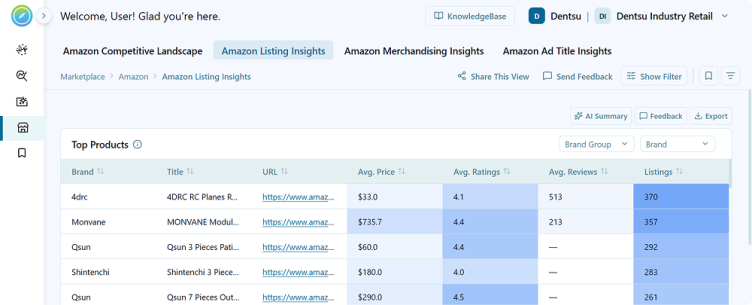
We’ve introduced a new Amazon Listing Insights report listed under Amazon report group, giving you visibility into the top shopping products detected across your scans. The “Top Products” table displays key details for each product, including Brand, Title, URL, Average Price, Average Ratings, Average Reviews, and total Listings count, sorted by highest listing volume by default.
This makes it easier to analyze competitive listings by price, ratings, reviews, and volume, helping you make more informed decisions on pricing, positioning, and overall listing strategy.
4. Added Amazon Merchandising Insights Reports
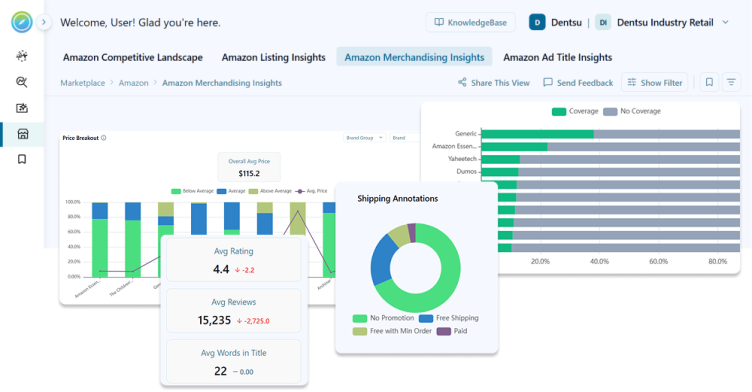
We’ve introduced a new Amazon Merchandising Insights report listed under Amazon report group, giving you a comprehensive view of benchmark pricing, keyword coverage, annotations, and rating/review trends against competitors and your own brand over time. The report includes five key widgets:
Price Breakout shows how your pricing compares to competing brands, with a stacked bar per brand displaying the percentage split of Below Average, Average, and Above Average priced listings, along with your brand’s average price clearly marked.
Keyword Coverage highlights how well each brand’s listings are covered across relevant keywords, with a stacked bar view showing Keywords with Coverage versus No Coverage Keywords, sorted by highest coverage by default. You can drill into the specific keywords lacking coverage for any selected brand.
Annotations surfaces key listing metrics, including Average Rating, Average Reviews, Average Words in Title, and Average Price, along with period-over-period changes. It also displays Sale, Local Inventory, and Shipping Annotations as easy-to-read donut charts, so you can quickly see promotional and fulfillment trends by brand.
Ratings over Time tracks how product ratings shift over time, grouped into rating bands (No Rating, Below 3.5, 3.5 to 4.4, and 4.5 to 5.0), with daily, weekly, monthly, quarterly, and yearly views available.
Reviews over Time tracks review volume trends over time, grouped into review bands (No Reviews, Under 150, 150 to 500, and 500+), also available across daily, weekly, monthly, quarterly, and yearly views.
Together, these widgets give you a clear, ongoing view of how your pricing, keyword strategy, promotions, and customer sentiment stack up against the competition
5.Added Amazon Ad Title Insights Report
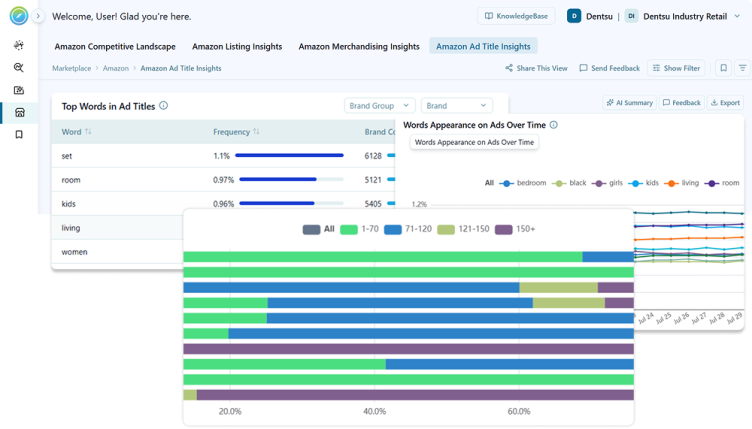
We’ve introduced a new Amazon Ad Title Insights report that gives you a clear view into what drives ad title performance on Amazon. It highlights the most used words in Shopping Ad titles, identifies which advertisers rely on them most, and shows how keyword usage trends over time. The report also benchmarks title length across top brands, helping you understand how your titles compare to the competition. With these insights, you can fine-tune your ad titles to align with proven, high-performing keyword strategies and industry standards.
6. Added Amazon Scan Parameters Report
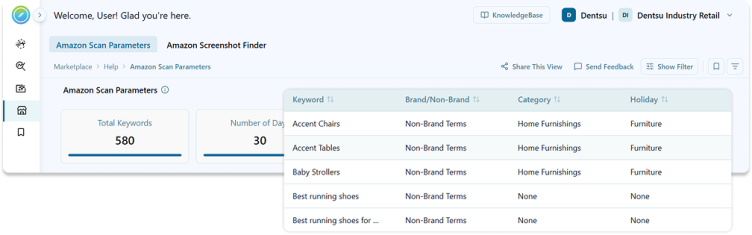
We’ve introduced a new Amazon Scan Parameters report, giving you full visibility into how Amazon data is collected. It displays the scan parameters used including keywords, number of days, locations, and platforms. Keywords are labeled as brand or non-brand terms, making it easy to filter and quickly narrow down to the views most relevant to you.
7. Added Amazon Screenshot Finder Report
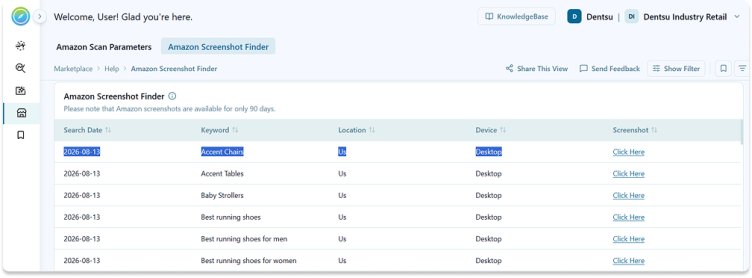
We’ve introduced a new Amazon Screenshot Finder report, allowing you to visually review Amazon search results through screenshots captured for each keyword. You can use the available filters to focus on specific dates, regions, platforms, or keywords, making it easy to zero in on the results most relevant to you.
8. Added Response Section filter in LLM Screenshot finder report
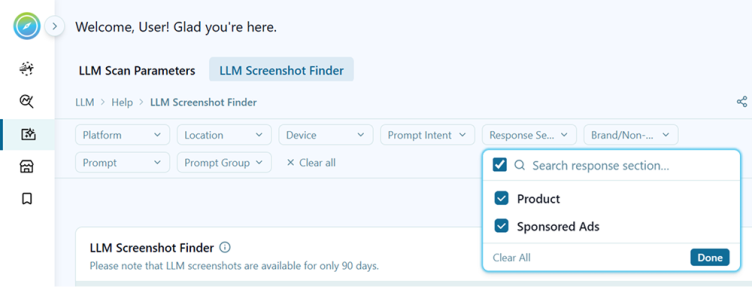
Added a new global filter Response Section for SERP Feature (Product or Sponsored Ads), in LLM Screenshot finder report making it easier to narrow down results and focus on the specific ad or listing types most relevant to your analysis.
9. Added functionality to Export Charts as Images
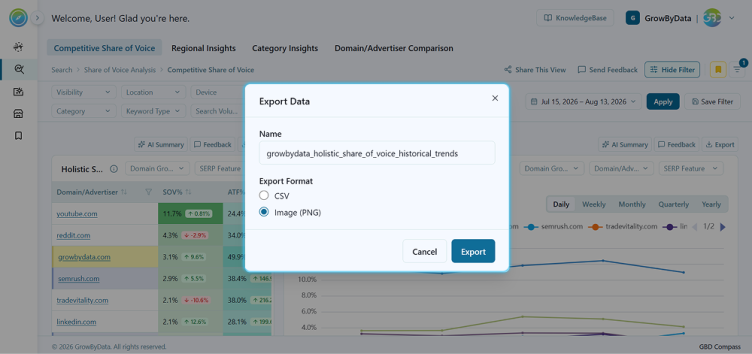
We’ve enhanced the chart export functionality to give you more flexibility in how you share and use your data. When clicking the Export button on any chart, users can now select “Image” as an export format, alongside existing options. This makes it easy to quickly capture and share visual insights without needing to take manual screenshots.
Enhancements
- Added Average Discount in Shopping Ads Report.
- Added a new LIA % (Local Inventory Annotations) column to the Merchant Listings report, giving you greater visibility into local inventory performance directly within your listings data.
- Refined the Top Citation Share metric in the LLM Visibility Overview report to exclude google.com.
- Enhancement in Product Insight report:
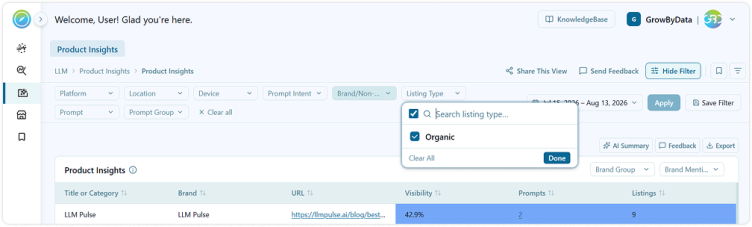
We’ve enhanced the Product Insight report by removing the brand name from the title for a cleaner view, replacing the favorability score with a visibility score for more meaningful insights, and adding a listing type global filter to toggle between organic and sponsored listings.
Bug Fixes
- Fixed an issue where clicking through from the Prompt Overview report to the Prompt Snapshot did not correctly carry over the account information, preventing the link from redirecting as expected.
- Improved Naming for Exported Reports (Exported files are now named using the client, report name, and report date range)
- The Shopping and Text Ads widget now correctly flags only advertisers with brand name in ad copy, with accurate results reflected in the Ad Copy Violation Details table on the Brand Trademark Protection report.
- Resolved an issue with nested filter implementation in the Holistic Share of Voice component, ensuring filters now apply accurately and reliably.
- Fixed design issue in Doman/Advertiser Comparison report
- Resolved an issue where the publisher group was not appearing correctly in cases where the publisher matched the client’s name, ensuring accurate display across all publisher listings.
- Resolved an issue where chart data was not exported correctly when the Monthly or Quarterly view options were applied.
- Fixed an issue where rank range values (e.g., “1-3”) were incorrectly auto-converted to dates (e.g., “3-Jan”) by Excel during export in reports like SERP Rank Tracking and Title Length.