
Key takeaways
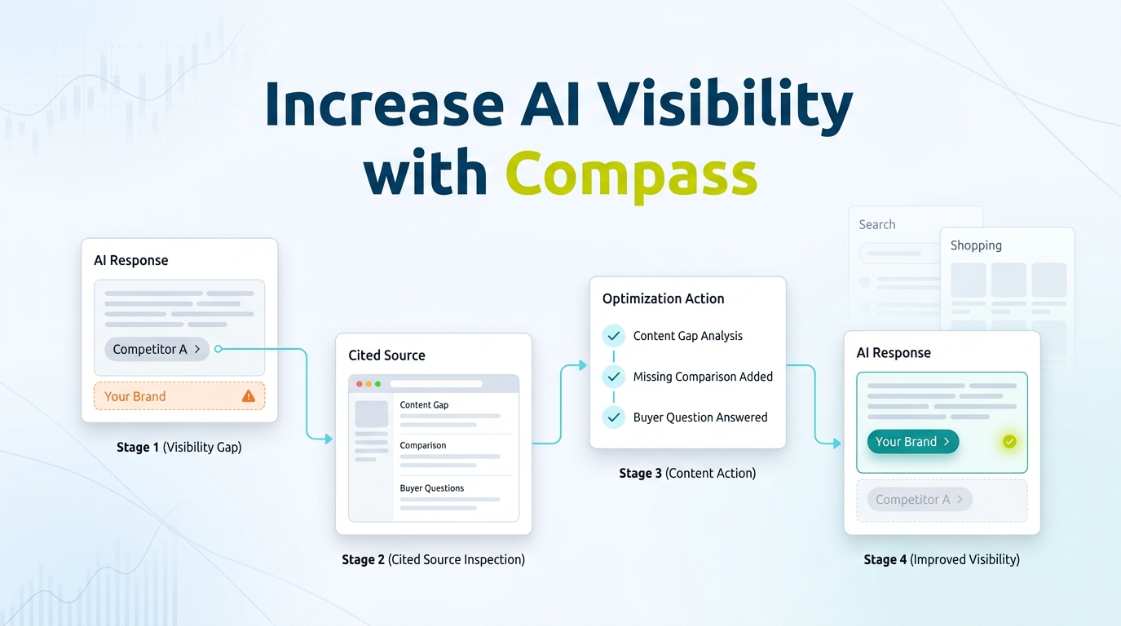
- Compass starts with a gap report: which prompt you lose, to which competitor, and which page they’re cited from instead of you.
- The workflow is nine steps: find, prioritize, diagnose, pick the right fix, publish, monitor, and compare against your Search and Shopping data.
- The fix depends on the cause: a structural rewrite, a new comparison page, a content gap fill, an entity-clarity fix, or earned third-party citations.
- Always compare the AI visibility gain against organic and Shopping share of voice on the same keyword. A citation win can hide a bigger loss elsewhere.
- Compass isn’t the deepest chat-only specialist. It’s built for teams who need AI visibility evaluated next to Search and Shopping, not in isolation.
Increasing your AI search visibility with GBD Compass starts with finding the specific prompts and pages where you’re losing to a named competitor, not a generic content refresh. Compass tracks your brand across ChatGPT, Perplexity, and Google’s AI Overviews and AI Mode on the same keyword set you already track for organic and Shopping. You get a gap report that says, specifically: you lose this prompt to this competitor, and here’s the page they’re cited from instead of you.
Finding the gap is only half the job. Choosing what to do about it and confirming the fix worked is where most teams get stuck. This piece covers both.
What GBD Compass shows you about AI visibility
Three layers, one dashboard: presence and citation tracking across your prompt set, a competitor view showing who’s winning each prompt instead of you, and a holistic overview putting AI visibility next to your Google organic and Shopping share of voice. That third layer matters most. A brand can gain AI citations while losing Shopping visibility on the same keyword, and a team looking at AI data alone will never catch it.
The full workflow: from gap to measured improvement
1. Find the prompts where competitors appear and you don’t
Pull the gap report inside LLM Intelligence. It maps your tracked keywords to buyer-intent prompts and flags every one where a named competitor gets cited and you don’t.
2. Prioritize by commercial importance, not by what’s easiest
A gap on a high-frequency, high-intent prompt beats five gaps on rarely asked long-tail ones, even if the long-tail fixes are simpler. Sort by prompt frequency first, then by proximity to a buying decision.
3. Identify the page the AI is actually citing
Usually a specific, identifiable page: a competitor’s comparison post, a third-party roundup, or their product page. Open it. Read it the way the model apparently did.
4. Work out why that source got picked over yours
Usually one of a few reasons: it answers the question more directly and earlier, it’s structured for a model to lift easily, it’s more recently updated, or it’s simply the only page addressing that prompt at all.
5. Choose the right optimization action
The fix depends on what step 4 turned up:
- Existing page loses the citation anyway: fix is structural. Add a direct definition near the top, shorten dense paragraphs, add a comparison table for competitive prompts.
- Winning prompt is a “you vs. them” comparison and you have no page for it: build one. It’s the highest-leverage asset for closing a named-competitor gap.
- Gap is category-level, not brand-level: strengthen product or category content, a buying guide or spec breakdown.
- Prompt is a real buyer question you never answer: write the page, in language close to the prompt.
- Content is solid but the model seems confused about your brand: fix entity clarity, inconsistent naming, thin structured data, a vague homepage.
- Competitor wins through third-party mentions you don’t have: pursue earned citations instead of another page on your own domain.
See this gap report built on your actual domain.
Book a session and we’ll show you where you’re losing AI visibility to a named competitor right now.
6. Publish the change
Ship it through your normal review process, with the target prompt and expected outcome noted somewhere your team can check later. Skip this and “did it work” becomes a guess in three months.
7. Monitor the same prompt on the next tracking cycle
Compass reruns your tracked prompts automatically. Watch the specific prompt you targeted, not just your overall presence rate, which can mask whether the one gap you worked on actually closed.
8. Compare against your organic and Shopping data
Confirm the AI visibility gain didn’t cost you organic or Shopping share of voice on the same keyword. A page that gains a citation but quietly loses a Shopping placement isn’t a clean win.
9. Feed the result back into prioritization
Whatever worked is a signal for what to try on a similar gap next. Whatever didn’t move the needle after a full cycle is worth abandoning before you repeat it elsewhere.
How is GBD Compass different from a standalone AI visibility tool?
Most AI visibility tools, including well-funded specialists like Profound, answer one question: how do you show up in AI search. If that’s genuinely the only thing on your plate, a specialist built for nothing else may be the simpler fit. Compass is built for a Director or VP answering for search performance broadly, where AI visibility sits alongside ChatGPT brand monitoring, organic rankings, SERP features, and Shopping Ads data, on one tracked keyword set instead of four dashboards.
A quick scenario: a Director of SEO at a mid-market apparel retailer sees AI citations climbing after a content push, a good sign alone. Next to the same keywords in Google AI Mode monitoring and Shopping share of voice, the picture changes: a competitor’s PLA campaign was quietly winning the exact queries the content was supposed to protect. The AI win alone looked like progress. Next to the Shopping data, it was one bright spot inside a bigger problem.
If you haven’t set up monitoring yet, start with how to monitor AI search visibility, and check AI search visibility metrics for what to prioritize first.
Frequently asked questions
Do I need to already be a GBD Search Intelligence customer to use the LLM Intelligence module?
No. LLM Intelligence runs independently. The combined view, AI visibility next to organic and Shopping share of voice, is available to teams running both modules together.
How long does it take to see a gap report after setup?
Initial tracking data typically populates within the first tracking cycle once your prompt set and keyword list are configured. Ask your GBD contact for the timeline specific to your engine and prompt volume.
How long until an optimization action shows up in the data?
At least one full tracking cycle. A comparison page or entity fix usually takes longer to register than a simple structural edit. Competitive, high-frequency prompts move slower than long-tail ones.
Can Compass track competitors I haven’t explicitly added?
Yes. Compass surfaces whichever brands are actually getting cited in your tracked prompts, including ones you haven’t named. That’s often how teams discover a competitor winning a category they assumed they owned.
See your gap report, not a generic demo.
Book a session and we’ll pull real AI visibility and Shopping data for your domain.