
Pull up your GA4 dashboard. Look at Organic Search for the last two quarters.
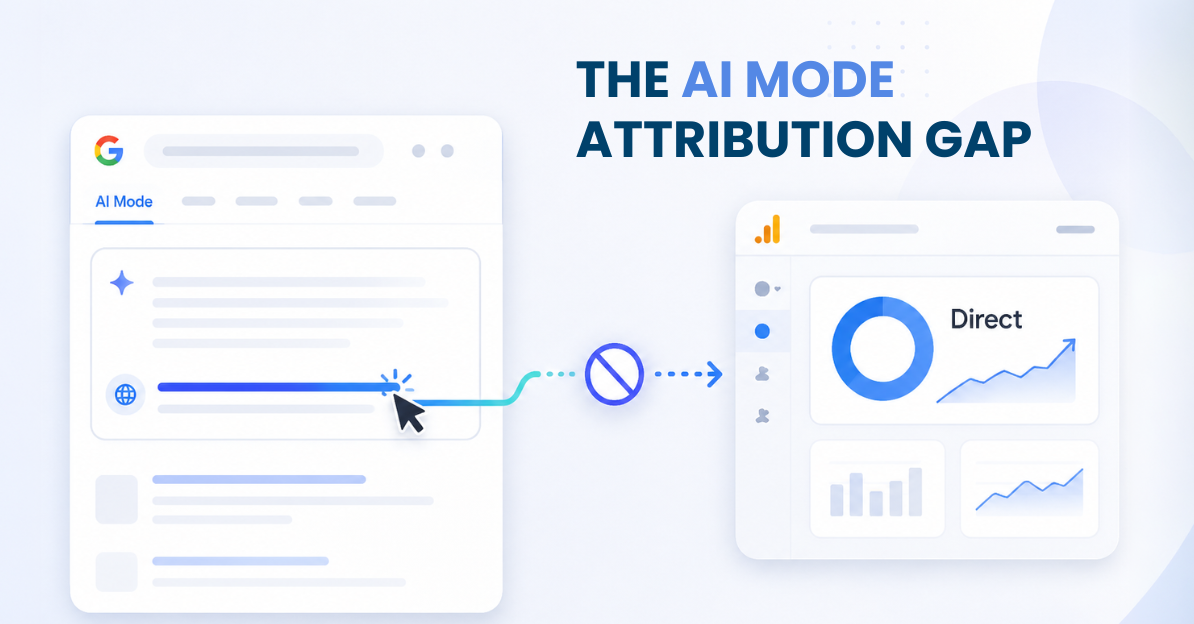
If it’s grown and you can’t fully explain why, some of that growth is probably AI Mode. Google fixed the old attribution bug that dumped this traffic into Direct back in 2025. What it didn’t fix is the part that actually matters to your reporting: you still can’t tell a normal blue-link visit from someone who arrived after a conversation with Google’s AI.
AI Mode traffic tracking means figuring out how much of your organic performance is coming through AI Mode specifically, not whether Google can see the click at all. Google can see it. It just won’t hand you the breakdown.
Why can’t you isolate AI Mode traffic in GA4?
AI Mode clicks pass google.com as the referrer, the same as a standard search result. GA4 reads that referrer and files the session under Organic Search.
That’s a real fix. For about ten days after AI Mode launched in 2025, this traffic really did land in Direct, unreferred and unexplained. Google patched it fast. Since then, an AI Mode session and a regular organic session look identical to GA4. Same channel, same source, same medium.
Which sounds fine until you need to answer a specific question: how much of your organic growth this quarter came from ranking well, and how much came from Google’s AI recommending you? GA4 has no way to split that out. It was never built to.
Google did ship something that looked, on the surface, like the fix. On May 13, 2026, GA4 added a default “AI Assistants” channel to isolate traffic from AI tools. Google’s own documentation names ChatGPT, Gemini, DeepSeek, Copilot, and Grok as examples of what it covers.
It explicitly excludes Google’s own AI Overviews and AI Mode. Google built a channel to separate AI traffic from everything else, and left its own AI search experience bundled into the one category it was supposed to help you break apart.
Search Console tells a different part of the story
Search Console launched a dedicated Generative AI performance report around June 2026. For a minute, it looked like the missing half of the picture.
It’s useful, with real limits. The report shows impressions: which of your pages got surfaced, on which dates, in which countries, on which devices. Queries aren’t in there. Neither is a clean way to isolate AI Mode clicks from the rest of your organic performance, in that report or anywhere else in Search Console.
You can look at it. You can’t build a dashboard on it.
So here’s where things actually stand, going into the back half of 2026. GA4 sees AI Mode traffic. It just can’t separate it from ordinary organic search. Search Console shows you that your pages are getting surfaced. It won’t show you what happened after, or what someone typed to get there.
What this actually costs you
Picture a Director of Ecommerce SEO at a mid-size retailer. Organic sessions are up 15% this quarter. Rankings on the usual tracked terms haven’t moved much. Branded search demand looks flat.
At the same time, Search Console’s Generative AI report shows thousands of impressions building on exactly those product pages.
So how much of that 15% is a normal ranking story, and how much is AI Mode sending people who never typed a traditional query at all? GA4 can’t answer that. Neither can Search Console, not in a form you can pull into a report.
That’s not a rounding error. It’s buyers narrowing a shortlist inside an AI Mode conversation before your page ever loads, credit for that going to “organic” the same as a decade-old blue link. A competitor picks up share inside those conversations while your reporting shows a normal quarter. And budget for next year gets planned around a growth story that’s only half true, hard to catch when nobody’s measuring ROI from AI search visibility as its own line item.
If organic’s been growing and you can’t say how much of it is AI Mode, that’s worth knowing before the number goes into next year’s plan.
See how Google AI Mode monitoring surfaces this. Talk to an expert →
What you can check manually right now
No new tool required to start:
- In Search Console, open the Generative AI performance report and note which pages are picking up AI Mode impressions. Cross-reference against your regular Performance report for the same pages.
- Watch for pages where AI Mode impressions are climbing but ranked-query clicks on the same page are flat. That combination is a reasonable signal something’s shifting outside your normal tracking.
- In GA4, segment Organic Search sessions by landing page and watch for growth concentrated on pages that also show rising AI Mode impressions in Search Console.
None of this gets you a real number. It gets you a shape, a set of pages worth watching more closely. That’s the honest limit of doing it by hand.
Why manual checks run out of road
At a handful of pages, cross-referencing two reports by hand is doable. At the scale most enterprise teams operate, hundreds of pages, several markets, it stops being realistic fast.
That’s the gap GrowByData built Google AI Mode monitoring to close. GrowByData is a search and AI visibility platform for enterprise brands, retailers, and agencies.
Instead of trying to reverse-engineer AI Mode exposure from blended organic traffic, it tracks whether your brand shows up inside AI Mode responses directly. Which competitors show up instead. How your share of voice moves, across your chosen markets and devices.
It’s watching the AI surface itself, the way you’d monitor a SERP, instead of waiting for GA4 to hand you a breakdown it was never built to give.
This is one piece of a bigger picture. GrowByData tracks the same kind of gap across ChatGPT brand monitoring and Perplexity brand monitoring, so you’re not stitching together three different blind spots by hand. For how it fits together, see the guide to AI search visibility. For the strategic case, Google AI Mode goes deeper.
The gap isn’t closing on its own
Google hasn’t indicated any plan to break AI Mode out of Organic Search in GA4, and the Search Console report still leaves query-level data out of reach.
Teams that figure out their real AI Mode share now get a head start on the ones still reading a flat GA4 report as the whole story.
Get a live look at your GrowByData Google AI Mode visibility report.