
Most retail Paid Search teams can tell you their CPC. Fewer can tell you why one product jumps three positions in the Shopping carousel while an identical listing next to it barely moves. That gap is the whole reason to understand how Google Shopping ads work: rank isn’t a single number you can check, it’s the output of several signals recalculating every time a shopper searches.
This matters more than it used to. Shopping categories have gotten more crowded, and the teams who treat rank as a mystery tend to solve the wrong problem when a competitor pulls ahead. The teams who understand the mechanics fix the actual cause, usually faster and for less money.
How Google Shopping Ads Work, Step by Step
Every time someone searches a product term, Google runs an auction among every advertiser whose feed matches that query. The auction decides two things at once: whether your product is eligible to show at all, and where it lands relative to everyone else who also matched.
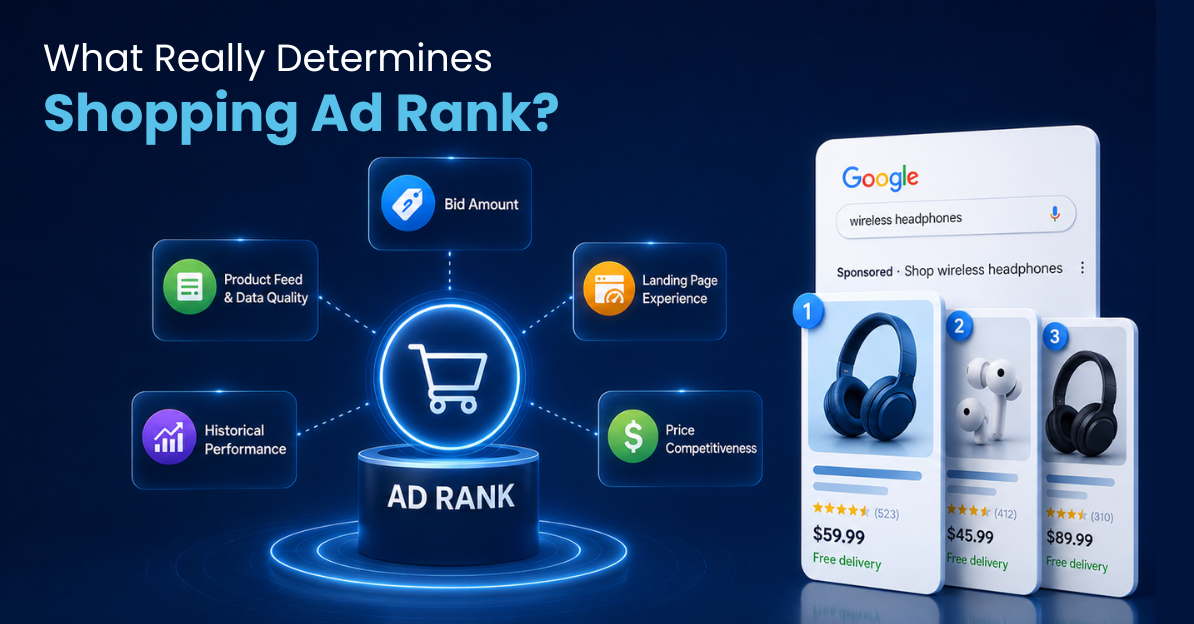
Google calls the output of that auction Ad Rank. It’s not a fixed score you can look up. It’s recalculated per query, per shopper, per moment, using your bid combined with a set of quality signals tied to your product feed and your account’s track record.
That’s the part most retail teams miss. Two advertisers can bid the exact same amount on the exact same query and land in completely different positions, because Ad Rank was never just about the bid.
There’s also a distinction worth separating out: eligibility and rank are two different questions. Eligibility asks whether your product qualifies to show at all, which depends on feed policy compliance, targeting, and budget availability. Rank asks where it lands once it’s already eligible. A product can be fully eligible and still rank poorly, which is the situation most of this article is actually about.
The Real Factors Behind Your Google Shopping Ad Rank
Five things combine to produce Ad Rank for any given Shopping listing:
- Bid amount. The maximum you’re willing to pay for the click. Still a real input, just not the only one, and treating it as the only lever is the single most expensive mistake in this list.
- Product feed and data quality. Title accuracy, image quality, GTIN and category mapping, price and availability freshness. A feed with gaps or stale data drags rank down regardless of bid, because Google can’t confidently match an incomplete listing to a specific query.
- Historical performance. Click-through rate and conversion history on that product tell Google how relevant your listing has been to shoppers who searched similar terms before. New products start with no track record, which is a separate problem from a bad one.
- Landing page experience. Load speed, mobile usability, and whether the page matches what the ad promised. A shopper who bounces in two seconds tells Google something, even if they never see your product page.
- Price competitiveness. Not the lowest price in the category necessarily, but priced in line with what the query’s shoppers are used to seeing for that product type.
None of these operate in isolation. A strong feed with a mediocre bid regularly outranks a weak feed with an aggressive one, which is exactly why “just raise the bid” is such an expensive habit to fall into.
How This Differs From Search Ads Quality Score
If you’ve managed Google Search campaigns, you already know Quality Score: a 1-to-10 rating tied to expected CTR, ad relevance, and landing page experience, checked at the keyword level. It’s tempting to assume Shopping works the same way. It doesn’t, and the difference matters for where you spend your optimization time.
Shopping has no visible Quality Score number, no keyword-level bidding, and no ad copy to write. Google reads your product feed instead of a set of keywords you chose, which means the “keyword research” instinct that drives Search campaign structure doesn’t transfer directly. What replaces it is feed structure: category mapping, attribute completeness, and how precisely your product data describes what you’re actually selling.
The practical result: a Paid Search Director who’s excellent at Quality Score optimization can still underperform in Shopping if they’re applying Search-campaign instincts to a feed-driven auction. The skill set overlaps, but it isn’t identical.
Does Bidding Higher Guarantee a Better Position?
No, and this is where a lot of budget gets wasted. Teams that watch a competitor pull ahead in the carousel tend to reach for the bid slider first, because it’s the one lever that feels directly in their control. It’s also usually not the actual problem.
If your feed has a vague title, a stale price, or a thin product image, a higher bid buys you a slightly better seat at an auction you were still going to lose. The fix in that case is the feed, not the budget. Retail teams that treat Ad Rank as a bidding problem first tend to spend two or three cycles chasing the wrong lever before anyone checks the feed.
Picture a Director of Paid Search at a mid-size home goods retailer who notices a top competitor pulling ahead on a category’s core terms. The instinct is to raise bids across the category to match. Three weeks later, CPC is up 15%, and position has barely improved, because the actual gap was product image quality on a set of listings that hadn’t been refreshed in over a year. The bid increase was solving a problem the feed had already created.
If you’re not sure whether your rank problem is a bid problem or a feed problem, that’s worth a real conversation before you touch the budget.
Talk to an expert to see where your Shopping visibility actually stands.
What Rank Volatility Actually Looks Like
Ad Rank isn’t something you set once. It moves with every auction, which means a product’s position can shift meaningfully within days without anyone on the team changing a single setting.
Three things typically drive a swing that has nothing to do with your own account: a competitor raises bids on overlapping terms, a competitor refreshes their feed with better product data, or seasonal demand shifts which queries carry the most weight. Any one of these can move your position even though your campaign settings never changed.
[DUMMY DATA: replace with verified Compass export before publish. Example shape: “In one tracked apparel category, a mid-market advertiser’s average Shopping position moved from #3 to #7 over four days after a competitor raised bids on overlapping terms, then partially recovered the following week once the competitor’s promotional push ended.”]
That kind of swing is easy to miss if the only thing you’re watching is your own account’s performance. It shows up as a conversion dip with no obvious internal cause, because the cause wasn’t internal. Retail teams that track Shopping carousel activity at the competitor level, not just their own auction results, catch this while it’s happening instead of explaining it after the fact.
How to Actually Improve Your Google Shopping Ad Rank
Rank problems tend to get solved out of order: bid first, feed last, when the effective order is closer to the reverse. Here’s the sequence that actually moves the needle, roughly ranked by speed of impact:
- Audit your feed before you touch your bids. Missing GTINs, vague titles, and outdated pricing are the most common rank killers, and fixing them costs nothing but time. Our guide to optimizing Shopping product titles covers this in detail.
- Check price competitiveness against your actual category, not your assumptions. A price that felt competitive last quarter can drift out of range as competitors adjust. See our breakdown of price competition and CPC for how this plays out in practice.
- Build historical performance deliberately. New products or recently edited listings start with thin performance history. Give them time and clean data before judging their rank, and resist the urge to overhaul a listing again before it’s had a fair sample size.
- Fix landing page friction. A slow-loading or mismatched product page undercuts every other signal you’ve optimized, because it tells Google the click didn’t lead anywhere good.
- Bid last, not first. Once feed, price, and landing page are solid, bid adjustments start doing what they’re supposed to do instead of masking a different problem.
Teams that work this list in order tend to see rank improvements that hold. Teams that skip straight to bidding tend to see a short-lived bump that fades once the competitor they were chasing makes their own adjustment.
Common Questions About Google Shopping Ad Rank
What is Google Shopping Ad Rank?
Ad Rank is the combined score Google calculates for each Shopping listing at auction time, based on your bid and a set of quality signals tied to your product feed, historical performance, and landing page. It determines both whether your product shows and where it lands.
Does a higher bid always win?
No. A listing with strong feed quality and performance history can outrank a higher bid with weak underlying data. Bid is one input among several, not the deciding factor on its own.
How often does Google Shopping ad rank change?
Ad Rank recalculates at every auction, which happens each time a shopper’s query matches your feed. In practice, visible position can shift day to day or even within a day as competitor bids, your own performance data, and query patterns change.
Is Google Shopping ad rank the same for every shopper?
No. Ad Rank is calculated per query and per context, which includes the shopper’s location, device, and search history. Two people searching the same term at the same moment can see different Shopping results, so “my rank” is really an average across many individual auctions rather than one fixed position.
Rank isn’t a setting you configure once and leave alone. It’s a live outcome of your feed, your history, and what everyone else in your category is doing at the same time. Talk to an expert to get a clear read on where your Shopping ads actually stand.