Most Paid Search Directors think they’re monitoring Google Shopping Ads. They’re checking Auction Insights weekly, pulling Performance Max reports, maybe running a competitor price check once a month. It feels like coverage. It isn’t.
The monitoring methods most enterprise teams rely on were built for a version of Google Shopping that no longer exists. They miss the majority of competitive activity happening on the SERP – not because of tool quality, but because of how the data is captured. By the time the gap shows up in your conversion data, a competitor has already taken the share.
This guide covers how to monitor Google Shopping Ads correctly: what that means at enterprise scale, where standard approaches fall short, what signals actually matter, and how to build a workflow that connects monitoring data to decisions.
Table of Content: Show
What Google Shopping Ads Monitoring Actually Means
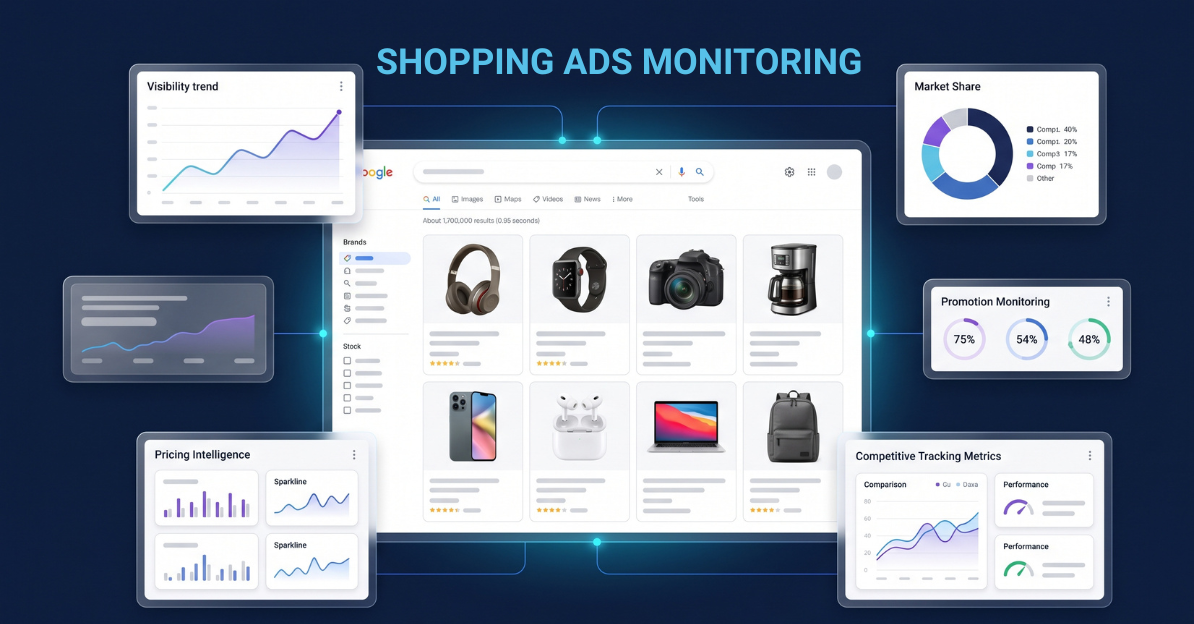
Google Shopping Ads monitoring is the ongoing tracking of where Product Listing Ads appear in Google SERPs – yours and competitors’ – across a defined keyword set, measured by share of voice, merchandising signals, and SERP feature context. Not a one-time audit. Not a monthly report. A continuous competitive intelligence layer.
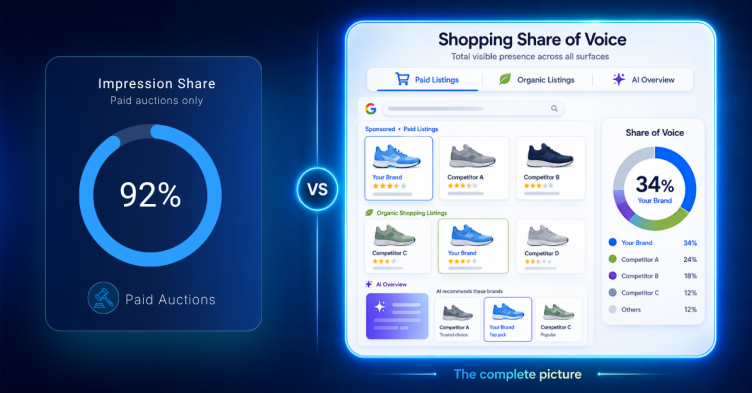
That definition matters because most teams confuse monitoring with reporting. Google’s own tools – Auction Insights, Performance Max dashboards, Merchant Center diagnostics – tell you what happened inside your account. They don’t tell you what competitors are doing on the SERP, which keywords are becoming more competitively dense, or whether a rival brand just switched to an aggressive discounting strategy. That’s what monitoring is for.
The distinction between account reporting and SERP monitoring is where most enterprise teams have a gap. Understanding why that gap exists starts with how Shopping Ads data is captured. For a broader view of how Shopping Ads visibility has changed over the past two years, that context is worth reading before going deeper here.
Why Standard Approaches Produce Bad Data
Why do different tools report different Google Shopping Ads visibility?
The honest answer: because they’re capturing different SERPs. And the gap between them is larger than most teams realise.
GrowByData tracks Shopping Ads across retail keyword sets using both logged-in account-based scraping and standard automated logged-out crawling. Across the same retail keyword set and time period, logged-in tracking shows Shopping Ads appearing at 15.1% average SOV. Standard automated logged-out tracking of the same period shows Shopping Ads at under 0.3% presence.
That’s not a rounding difference. Standard monitoring is capturing less than 2% of the Shopping Ads activity a real retail shopper actually sees.
What data do Google Shopping Ads tools miss?
Three structural failure modes explain this:
- Logged-out scraping misses personalised Shopping carousels. Google increasingly serves Shopping Ads based on user signals – browsing history, account data, purchase patterns. An anonymous crawler gets a heavily filtered view of the SERP. The Shopping carousel a logged-in retail shopper sees is substantially richer than what an unauthenticated bot captures. This isn’t a configuration issue – it’s how Google’s personalisation engine works, and no amount of proxy rotation fixes it.
- Auction Insights only shows competitors in your auctions. If a competitor is bidding on high-intent category keywords you’re not actively targeting, they’re invisible to Auction Insights entirely. You’re not losing share you can see – you’re losing share you can’t. This is particularly acute for brands that have pulled back on broad-match Shopping campaigns and are now flying blind on the category landscape.
- Keyword scope determines what you find. Most automated monitoring tools sample a broad keyword set at low frequency. A wide net at low resolution misses the competitive concentration on specific high-converting queries. The keywords where competitors are pouring budget cluster around commercial intent terms that need dedicated monitoring, not a statistical sample.
The result is a monitoring setup that feels functional but produces a systematically distorted competitive picture. For a deeper look at why standard tracking misses most Shopping Ads activity, the full breakdown is here.
See what your current monitoring is missing. Run your domain through GrowByData’s Revenue Risk Report – enter your domain and get a sample of your actual Shopping Ads competitive gap.
What You Actually Need to Monitor
How accurate is Google Shopping Ads share of voice reporting?
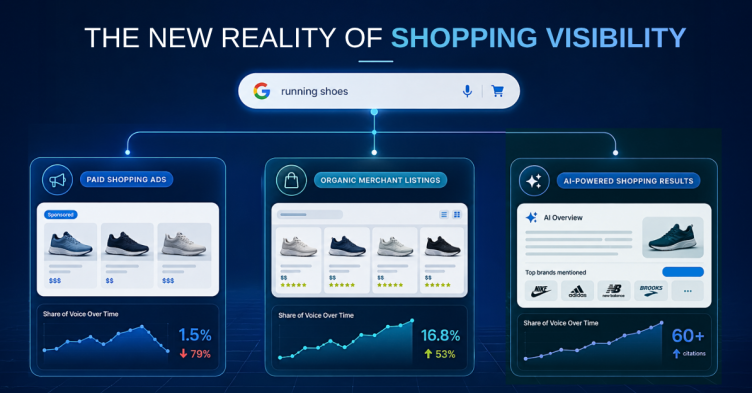
It depends entirely on what’s being measured and how. SOV is the right metric – but only when it’s derived from logged-in, profile-matched SERP captures across a keyword set weighted toward commercial intent. Here’s what that SOV picture actually looks like across a retail keyword set tracked by GrowByData:
| SERP Surface | Avg SOV – Logged-In Retail SERP | Avg SOV (Weekly) |
|---|---|---|
| Merchant Listings (organic Shopping) | 23.8% | 16.8% – 29.2% |
| Shopping Ads (paid PLAs) | 15.1% | 7.3% – 23.5% |
| AI Overview | 8.3% | varies |
| Organic (10 blue links) | 8.4% | varies |
Two things jump out of that table. Merchant Listings – the organic Shopping surface – has higher average SOV than paid Shopping Ads. Most teams fund their paid programme aggressively and underinvest in organic Shopping. The data suggests that’s backwards for at least some of the SERP. And Shopping Ads SOV swings from 7.3% to 23.5% week over week – a monthly snapshot misses those peaks and troughs entirely, which is exactly when competitive opportunities open and close.
Here are the five signals a complete monitoring setup needs to track:
- Shopping Ads SOV by competitor, week over week. Not just whether ads appeared – who’s winning share and by how much. A competitor scaling SOV from 8% to 18% on your core category keywords over three weeks is a strategic signal, not statistical noise.
- Merchant Listings alongside Shopping Ads. These are separate competitive surfaces with separate winners. A brand dominating your paid Shopping landscape may be losing the organic Shopping battle entirely – or vice versa. Monitoring one without the other gives you half the picture. See the full breakdown of Google Shopping organic listings for why this surface is increasingly competitive.
- Annotation and merchandising signals. Price drop badges, sale tags, shipping labels, product ratings – these directly affect click-through rate on Shopping carousels. Knowing a competitor switched to aggressive price-drop annotation before it shows up in your own conversion data is the whole point of monitoring. The complete guide to Shopping Ads extensions and annotations covers what each label signals competitively.
- Weekly cadence as the minimum. Shopping Ads SOV swings by more than 16 percentage points across a typical eight-week period. Monthly monitoring treats that volatility as background noise. Weekly tracking treats it as signal – which it is.
- SERP feature co-occurrence. When Shopping Ads appear on the same SERP as an AI Overview – and AI Overviews appear on 8.3% of logged-in retail SERPs in this dataset – the click dynamic changes. Monitoring Shopping Ads in isolation misses the context of what else is competing for the click. The apparel data tells this story concretely: how Shein and Quince have dominated apparel Shopping Ads SOV shows what happens when brands treat SOV as a standalone metric.
How to Build a Monitoring Workflow at Enterprise Scale
How do I track Google Shopping Ads visibility?
Most teams answer this question by buying a tool. The tool isn’t the hard part. The workflow is.
Here’s the four-step structure that connects monitoring data to decisions – the only version of monitoring that has ROI:
- Define your keyword set by intent tier. Not all retail queries show Shopping Ads equally. High-intent transactional queries – branded competitor terms, category plus modifier combos, SKU-level searches – show materially higher Shopping Ads presence than broad informational queries. Weight your monitoring keyword set toward commercial intent. 200 well-chosen transactional keywords gives you more actionable competitive signal than 2,000 loosely themed ones.
- Set your capture method deliberately. Logged-in, profile-matched scraping for Shopping Ads specifically – the data gap versus logged-out automated crawling is too large to ignore for this surface. Standard automated tracking works for broad SERP feature presence at scale. These two methods answer different questions and should run in parallel, not as substitutes for each other.
- Build a baseline before you optimise. The first four weeks should be baseline-building, not action-taking. You need to know what normal looks like – typical SOV ranges, seasonal patterns, which competitors are consistently present versus sporadically active – before a week-over-week shift means anything. An alert threshold set without a baseline is a guess. Set with one, it’s a decision trigger.
- Define the action protocol before you launch. Who receives the weekly SOV report? What SOV shift triggers a bid review? What annotation change on a competitor triggers a merchandising response? These questions need answers before the monitoring starts – not after the first anomaly appears. The teams that get ROI from Shopping Ads monitoring have a defined owner and a defined action path. A dashboard nobody checks is just infrastructure cost.
What Good Monitoring Enables Strategically
The operational case for Shopping Ads monitoring is straightforward: see what competitors are doing before it hits your numbers. The strategic case is bigger than that.
- Competitive response speed. Seeing a competitor scale Shopping Ads SOV on your core category keywords before it shows up in your own conversion data means you can respond in the same budget cycle – not the next one. In retail, where SOV shifts of 8 to 10 percentage points can happen in a single week, that lag time is the difference between defending share and recovering it.
- Budget defence and opportunistic capture. When a competitor pulls back – seasonal budget resets, end of quarter, promotional lulls – SOV doesn’t disappear. It redistributes. The brands watching weekly are positioned to capture it at lower CPCs. The brands checking monthly find out after the window has closed.
- The organic vs paid allocation conversation. Merchant Listings averaging 23.8% SOV against Shopping Ads at 15.1% in retail SERPs tells a VP of Ecommerce something specific: organic Shopping is a bigger surface than paid Shopping on a significant portion of the keyword set, and it’s being competed for actively. Most enterprise organisations fund paid and underinvest in organic Shopping optimisation. The monitoring data makes that imbalance visible in a way that a P&L conversation never quite captures.
That last point tends to open conversations at the CMO level that pure paid-search reporting can’t. Which is ultimately what the data is for – not just telling you what happened on the SERP last week, but equipping the people making budget decisions with a clearer competitive picture than their counterparts have.
GrowByData’s Google Shopping Ads monitoring platform tracks SOV, competitor PLAs, Merchant Listings, and annotation signals across your keyword set – with the logged-in capture methodology that closes the visibility gap standard tools leave open.
Most Shopping Ads monitoring setups have a structural blind spot. GrowByData will map your keyword set, run the baseline, and show you your competitive gap in the first session – so you’re making budget decisions with the full SERP picture, not a filtered one.