
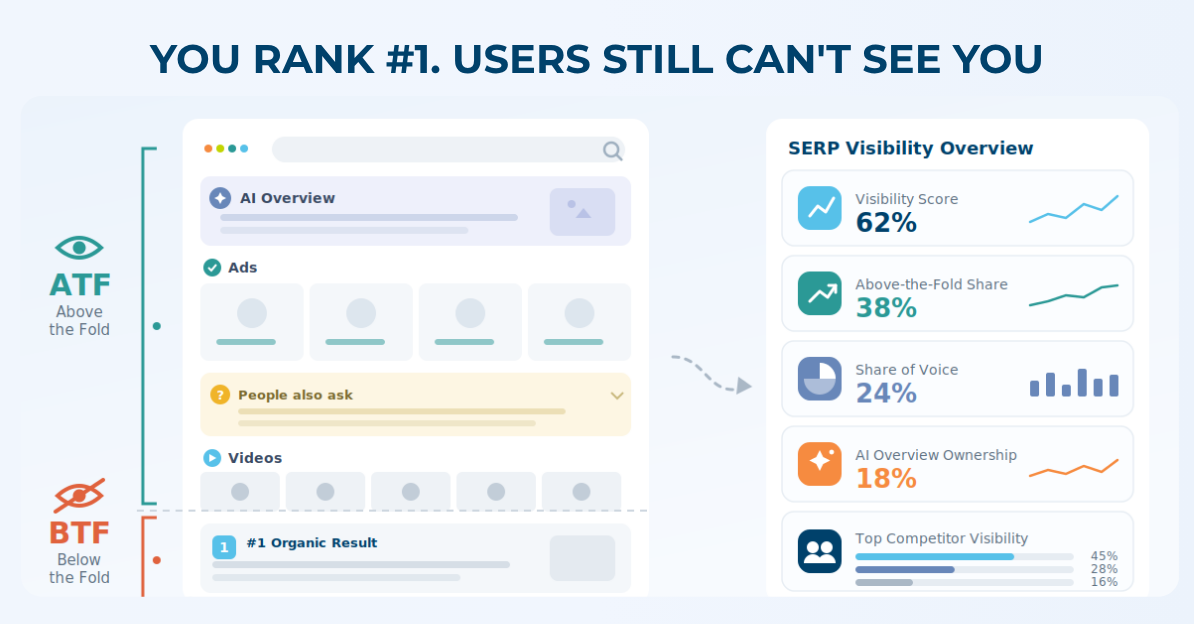
Your team reports a #1 ranking, and the traffic still doesn’t move. Here’s why: on a modern Google results page, your #1 organic link can sit below an AI Overview, four Shopping Ads, a People Also Ask box, and a video carousel pushed clean off the first screen. To track SERP features is to measure that whole page, not your position in it: which result types appear for your keywords, whether they land above or below the fold, and how much of the page your brand actually owns.
Most teams still track rank and call it visibility. That’s the mistake. Rank tells you where your link is; it says nothing about whether anyone sees it. This guide walks through how to track SERP feature visibility the way an enterprise SEO or paid search team actually needs to step by step, with the metrics that predict clicks instead of flattering a dashboard.
Table of Content: Show
- How to track SERP features: the short answer
- Step 1: Decide what to track
- Step 2: Capture the full SERP, not just rank
- Step 3: Measure your share of SERP
- Step 4: Segment by market and device
- Step 5: Track AI surfaces as SERP features
- Turn tracking into action
- Why rank tracking alone can’t do this
- How GrowByData tracks SERP feature visibility
- Frequently asked questions
How to track SERP features: the short answer
To track SERP features, monitor every result type on the page for your keyword set, not just organic position and measure how often each appears, whether it sits above or below the fold, and how much of it you own versus competitors. Five steps:
- Decide what to track: the keywords and the features that move revenue.
- Capture the full page layout, splitting each feature above versus below the fold.
- Measure your share of SERP, overall and by individual feature, against competitors.
- Segment by market and device, where the feature mix changes.
- Track AI surfaces: AI Overviews, ChatGPT and AI Mode as SERP features too.
A rank tracker can’t do this; it reports a position, not the page. A dedicated SERP feature tracking tool like GrowByData captures the whole layout across every keyword and market.
Step 1: Decide what to track: keywords and features
Don’t track all 20+ features across every term. Map the few that decide revenue. For commercial queries that’s usually AI Overviews, Shopping Ads, Merchant Listings, and People Also Ask, the features that physically sit above your organic listing and intercept the click.
Start with the 1,000-2,000 queries your buyers use at the point of purchase, not your biggest head terms, and tag which features fire on each.
A VP of Ecommerce doesn’t care that you rank for 50,000 keywords; they care about the 200 that sell product.
That tagged set becomes your tracking cohort, the place a lost AI Overview or a new Shopping block shows up as a visibility drop before it shows up as a traffic drop. (More on why volume alone misleads: keyword volume isn’t enough for enterprise SEO.)
Step 2: Capture the full SERP, not just your rank
Record every feature on the page, its order, and whether your result lands above or below the fold, not just a numeric rank. A rank tracker returns “position 4.” A SERP feature tracker returns the layout: what sits above position 4, how much vertical space it eats, and where your listing falls relative to the fold.
Two listings at “position 4” can have completely different real visibility. One is the first thing a user sees. The other is buried under an AI Overview, four ads, and a carousel. The metric that predicts CTR is above-the-fold presence not position.
This is the gap between presence and visibility. A feature can appear on 100% of your keywords yet sit below the fold on most of them, so your coverage looks healthy while your real visibility is quietly low. Splitting every feature into above-the-fold and below-the-fold is what turns a vanity number into an honest one.
Step 3: Measure your share of Voice against competitors
Tracking your own visibility in isolation is half the picture. The first question a CMO or VP of Search asks is blunt: who’s winning this category, and by how much?
Measure share of SERP at two levels, overall (your slice of the whole page) and by individual feature (who owns Organic, who owns the AI Overview, who owns Merchant Listings). A competitor can be invisible in overall SOV and still own the one feature that converts. That’s the gap a rank report hides: if a rival starts capturing the AI Overview or the Featured Snippet you used to hold, you won’t see it in a position report until your clicks have already dropped. (Competitive SERP Analysis covers the full method.)
Curious where your own brand stands? Talk to an expert and see your visibility gap across Search and AI on your own keywords.
Step 4: Segment by market and device
SERP features shift by location and device. A query that shows a Local Pack and Shopping Ads in Chicago may return an AI Overview and plain links in Toronto, and something different again on mobile. A single national, desktop-only snapshot hides most of your real visibility and for retailers with regional inventory or pricing, that’s where local intent gets won or lost. (Local and international SERP monitoring handles this at scale.)
If you track Europe, treat it as its own market, not a translation. Post-DMA, Google Shopping in the EU runs through comparison-shopping services (CSS), so the Shopping layer is structurally different from the US and data-consent rules shape what you’re allowed to collect on EU users. Don’t assume a US playbook transfers cleanly.
Step 5: Track AI surfaces as SERP features
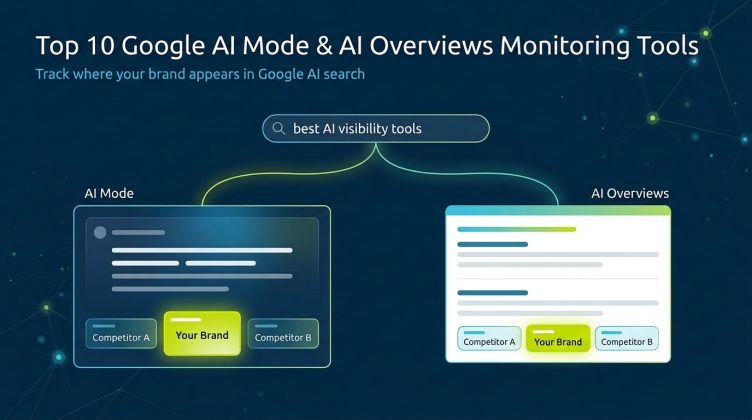
AI Overviews appear on roughly 47% of US searches, and Google’s AI Mode is expanding fast (GrowByData’s AI Overviews analysis). Treat them as SERP features, not a side channel. The questions don’t change: are you cited, who’s cited next to you, and how much of the answer do you own?
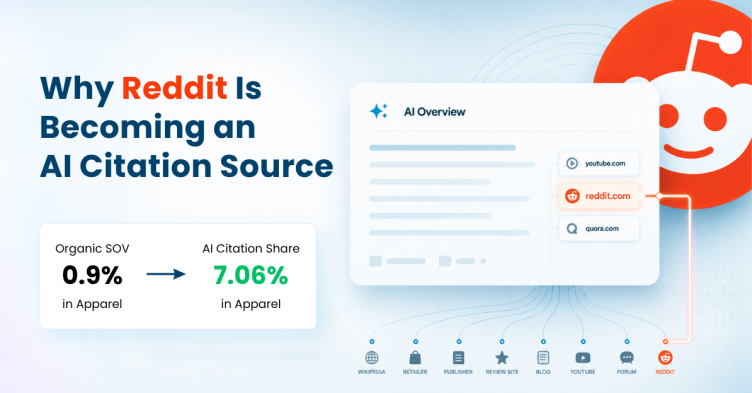
Most rank trackers don’t capture AI Overview citations at all so a fast-growing slice of your visibility never reaches your reporting. And here’s the part that surprises people: AI citation is largely an off-page game. Tracking consistently shows Reddit, YouTube, and Quora taking the biggest share of AI Overviews, often ahead of brand sites.
So the real signal isn’t only whether your page is cited, it’s which third-party sources the AI trusts for your topics, which tells your PR and off-page team exactly where to push. (For brand visibility inside ChatGPT, Perplexity, and AI Mode specifically, that’s LLM visibility tracking.)
Turn tracking into action
Tracking is the input; the point is fixing what you find. Losing Featured Snippets means restructuring content for direct, extractable answers. Missing People Also Ask means mapping and answering the question clusters around your terms. The teams that win run it as a loop, monitor, find the loss, optimize, re-measure not a one-time audit.
Why rank tracking alone can’t do this
A rank tracker reports a position, not the page layout, your share of each feature, or whether you’re cited in AI. That’s the whole reason this workflow needs a tool built for the full results page.
(For the full comparison, see SERP Monitoring vs Rank Tracking: What Enterprise Teams Need.)
How GrowByData tracks SERP feature visibility
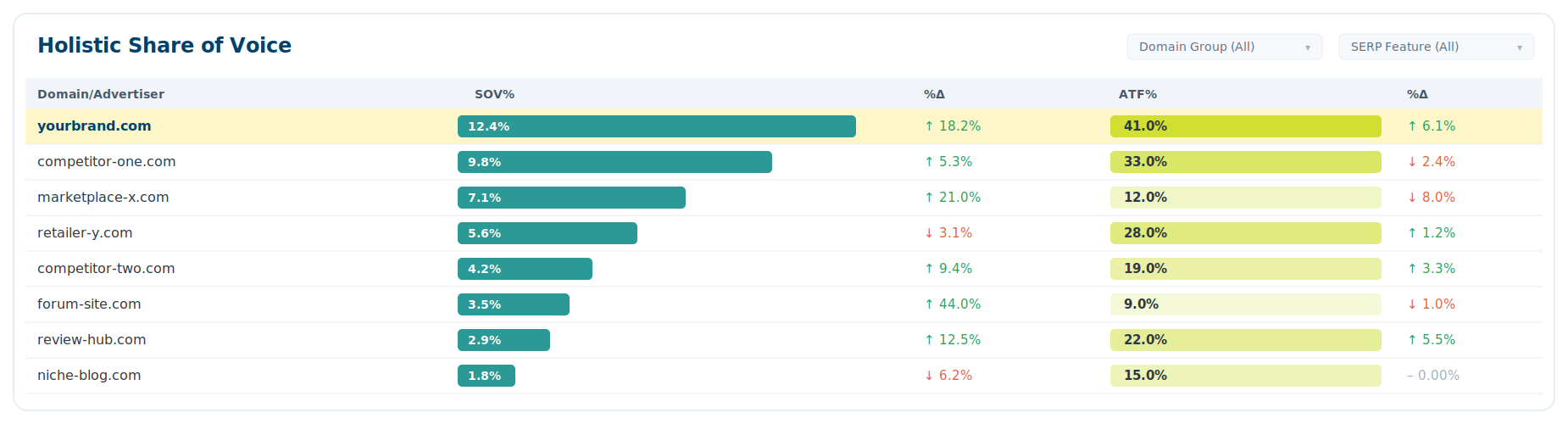
GrowByData’s SERP Tracking was built for this exact method. It charts all 20+ features for your keyword set and splits each into above- and below-the-fold, so presence and real visibility never get confused. Its Holistic Share of Voice ranks every competing domain by overall and above-the-fold SOV, and the per-feature leaderboards show who owns Organic, the AI Overview, or Merchant Listings right down to a single category like Google Shopping.
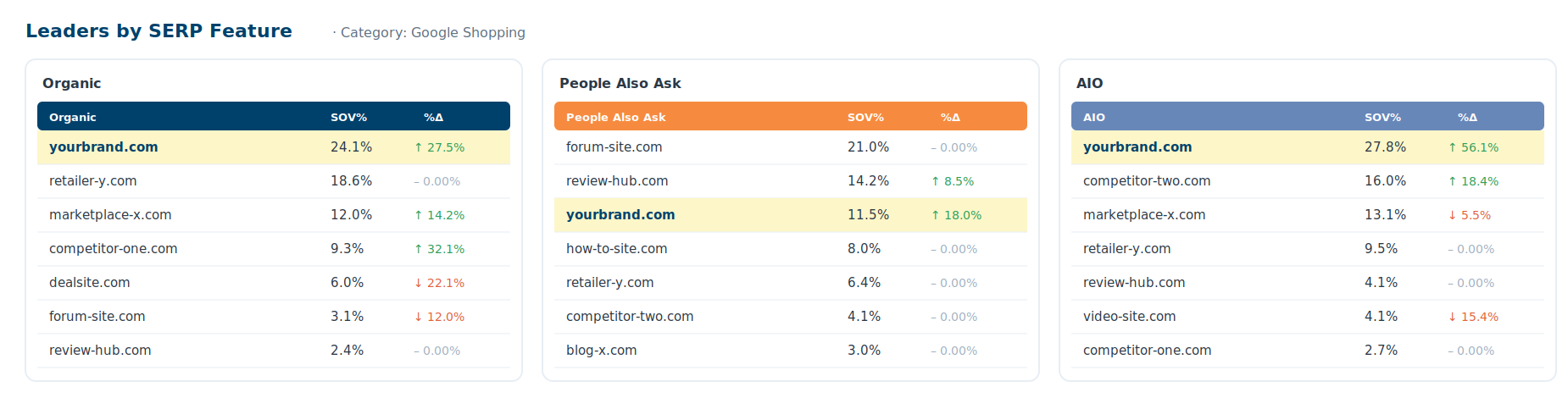
Region, device, and category filters rebuild any view for the market you actually sell in, and AI Overview and AI Mode citations sit in the same dashboard as traditional features. That’s one picture of where your brand shows up across Search and AI instead of a rank tracker, an ads tool, and a separate AI monitor stitched together and never quite reconciled.
Frequently asked questions
What is SERP feature tracking?
SERP feature tracking is the practice of monitoring every non-organic element on a search results page. AI Overviews, People Also Ask, Featured Snippets, Shopping Ads, Merchant Listings, and more to measure how often each appears for your keywords and how much of it your brand owns versus competitors. It goes beyond rank tracking, which reports only your numeric position.
How do you track SERP features?
Decide which keywords and features matter, capture the full page layout (including above- versus below-the-fold placement), measure your share of each feature against competitors, segment by market and device, and track AI surfaces like AI Overviews as features. A SERP feature tracking tool automates this across every keyword and market.
How often should you track SERP features?
For commercial keywords where features and competitors shift quickly, Shopping Ads, AI Overviews, Merchant Listings, track daily so you catch visibility losses within days, not at quarter-end. Stable informational terms can be tracked weekly. The point is continuous monitoring, not a one-time audit.
How do you track SERP features in AI Overviews and AI Mode?
Treat AI Overviews and AI Mode as SERP features and track whether your brand is cited, which competitors are cited alongside you, and how that citation share trends. Because AI engines pull heavily from third-party and community sources, effective tracking covers the sources cited for your topics, not just your own pages.
What’s the best tool to track SERP features?
The right tool tracks 20+ features across every keyword and market, separates above-the-fold from below-the-fold visibility, reports share of SERP by feature against competitors, and includes AI Overview and AI Mode citations in the same view. GrowByData’s SERP Tracking was built for this.